 Kaldera
The site asks, the extension checks
The content script finds a login form on the page you are on and asks the background worker. The worker validates the tab URL against the records it may offer — same eTLD+1 or an explicitly saved match.
Product / Browser extension
The KalderaShield extension is a Manifest V3 companion for Chromium and Firefox. It fills credentials only on sites it can bind to an existing record, talks to the desktop app over an encrypted loopback bridge, and collects nothing.
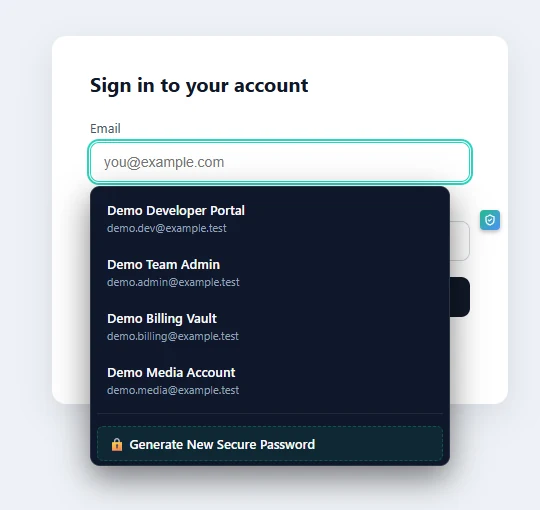
The extension injects a content script into http/https pages and offers to fill credentials for the site you are on. Domain matching is validated down to eTLD+1 — lookalike domains on different registrable domains do not receive another site's credentials, and a phishing-alert latch keeps warning once a mismatch is detected.
It has no broad page powers: the manifest requests nativeMessaging, activeTab and storage, the extension pages' CSP is script-src 'self', and the Firefox build declares data_collection_permissions: none. There is no analytics SDK and no telemetry in the bundle.
The pairing dialog on the desktop side must be accepted before the bridge works at all, credentials are leased to the bridge for five minutes at a time and zeroized on expiry, and a revoke action wipes the lease and rotates the pairing token immediately.
The content script finds a login form on the page you are on and asks the background worker. The worker validates the tab URL against the records it may offer — same eTLD+1 or an explicitly saved match.
The request travels over the native messaging bridge to the desktop app, which returns only credentials bound to that site — broad queries return sanitized metadata with empty passwords.
Filling is gated by tab-URL validation on the return path. The extension never accepts fill requests from web pages directly: pages cannot reach the extension's channel at all.
The extension stores no vault: it is a window into the desktop app, and without the paired desktop running it has nothing to give. It does not sync anything to any server, it does not read pages you have not activated it on, and malware with your OS privileges could reach the pairing token file — a residual risk documented in the threat model rather than denied.
nativeMessaging, activeTab, storage. No broad host access, no scripts evaluated from remote sources, CSP locked to 'self'.
Native messaging talks to the desktop over loopback TCP only; every frame is XChaCha20-Poly1305-encrypted under an HKDF-derived session key.
The Firefox build ships as a Mozilla-signed XPI (AMO), so it installs persistently on Release and Beta; the Chromium build loads unpacked or through your organization's policy.
No, by design. It holds no vault copy, so a stolen laptop with the extension installed still holds nothing. Everything it can offer comes live from the paired, locked-or-unlocked desktop session.
Domain validation at eTLD+1, a phishing-alert latch, and the fact that fill offers are bound to validated tab URLs. A different registrable domain is a different site, whatever it looks like.
No. The content script is active on http/https pages, but it only reacts to login forms and to your explicit requests through the popup or keyboard. There is no keystroke logging.